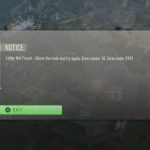
There’s little more frustrating in Rocket League than gearing up for some competitive action, only to be met with the dreaded “league servers down” message or crippling lag. Whether it’s an inability to connect, constant disconnections, or a slide show instead of smooth gameplay, server issues can quickly turn a fun session into a rage-quit scenario. Understanding precisely what’s happening behind the scenes and how to diagnose the problem yourself is key to getting back in the game, or at least knowing who to blame.
At a Glance: Navigating Server Issues
- Distinguish Local vs. Global: Learn to tell if the problem is your internet or a widespread server outage.
- Understand Server Anatomy: Grasp the roles of game servers and matchmaking servers in Rocket League.
- Use Status Tools Effectively: Discover how real-time server checkers provide critical insights into performance.
- Regional Impact Matters: See why your geographic location significantly affects server stability and ping.
- Practical Troubleshooting Steps: Get a clear playbook for diagnosing and potentially resolving common connectivity issues.
Rocket League, developed by Psyonix, delivers intense vehicular soccer action with its competitive multiplayer, cross-platform play, and customizable cars. This fast-paced environment demands a robust and stable online connection. When something goes wrong, it’s rarely just a minor inconvenience; it impacts matchmaking, real-time physics, and the fluidity of your entire game experience. The smooth operation relies on a complex web of servers designed for redundancy and low latency, but even the best systems face hiccups.
Pinpointing the Problem: Your Connection or Theirs?
The first hurdle when facing “league servers down” symptoms is determining the root cause. Is your own internet connection faltering, or are Rocket League’s servers experiencing a widespread outage? This distinction is crucial because the troubleshooting steps diverge significantly based on the answer. If your local internet is unstable, no amount of checking Rocket League’s official status pages will help. Conversely, if the game’s servers are genuinely down, you might be wasting time fiddling with your router.
Before diving deep into game-specific checks, always perform a quick sanity check of your local network. Are other devices connecting to the internet? Can you stream videos or browse websites without issues? A simple speed test can often reveal if your ISP is having problems, providing a baseline of your connection quality.
Deconstructing Rocket League’s Server Infrastructure
Rocket League’s online experience relies on a sophisticated server infrastructure, leveraging enterprise-grade facilities across major global data centers. These aren’t just single massive computers; they’re distributed networks designed for high availability and low latency.
Imagine two main types of server components working in tandem:
- Game Servers: These are the actual machines that host your matches. They handle the real-time physics calculations, player movements, ball trajectory, and state synchronization for everyone in a match. These are distributed geographically to minimize latency for players in different regions. If a game server region is “down,” you won’t be able to join or stay in a match hosted there.
- Matchmaking Servers: Operating somewhat independently, these servers orchestrate the entire player pairing process. They manage queues, apply skill ratings (MMR), form teams, and ultimately assign groups of players to available game server instances. Issues with matchmaking servers don’t necessarily mean game servers are offline, but they do prevent you from finding or joining matches.
This dual-system means that even if game servers are healthy, a problem with matchmaking can still make it seem like “league servers are down” because you can’t play.
The Tell-Tale Signs of a True Server Outage
When Rocket League servers are truly down, the symptoms are unmistakable: inability to log in, persistent “connection lost” messages, failure to find any matches despite long queue times, or a complete lack of access to online features. But how do you confirm it’s not just you?
This is where a dedicated server status checker becomes your best friend. These tools monitor various server regions in real-time, providing an objective snapshot of their health. A robust checker offers several key data points:
- Online/Offline Status: A clear indicator if regional server clusters are accepting connections. “Offline” or “Unreachable” means they’re not working.
- Latency Measurements: This is crucial. Real-time response times, measured in milliseconds (ms), show how quickly your connection reaches the server.
- Green (<200ms): Excellent performance.
- Yellow (200-300ms): Acceptable, but you might notice slight delays.
- Orange (300-399ms): Elevated, definitely noticeable lag.
- Red (400ms+): Problematic, often unplayable.
- Average Response Times: Rolling averages provide a consistent view of performance, helping to identify trends rather than just momentary spikes.
- Jitter Analysis: This metric measures the variation in latency over time. High jitter suggests an unstable connection or network congestion, leading to “stutters” and unpredictable lag, even if your average ping is decent.
- Best Server Identification: Some tools can automatically highlight the optimal server region for your current network conditions, which can be invaluable for choosing a region manually if needed.
For a comprehensive overview of how Rocket League’s servers are performing across different regions right now, you can consult a live status tracker. This can tell you if specific data centers, like those in North America (Virginia, Ohio), Europe (London, Frankfurt), or Asia (Tokyo, Seoul), are experiencing issues. Staying informed through such tools is the first step in diagnosing why you might be experiencing “league servers down” frustrations. For the most current data, you can check a dedicated resource like the [Live Rocket League Server Status](Live Rocket League Server Status).
Regional Variability: Why Your Location Matters
Server performance in Rocket League isn’t uniform across the globe; it varies significantly by geographic location, the time of day, and the current server load. Psyonix distributes its server clusters to data centers strategically to minimize latency for large player populations.
For instance, regions like North America (Virginia, Ohio, California, Oregon) and Europe (Dublin, London, Paris, Frankfurt, Stockholm) typically maintain high availability and robust performance due to their massive player bases. During peak hours, even these regions can experience increased load, but their infrastructure is designed to handle it.
Conversely, regions with smaller player bases, such as South America (São Paulo), Oceania (Sydney), or Africa (Cape Town), might experience elevated queue times during off-peak hours simply because there aren’t enough players to fill matches quickly. This isn’t necessarily a server outage, but it can feel like “league servers are down” if you’re struggling to find a game. Similarly, ping to these regions might be higher for players physically far away. Even within a continent, connecting to an East Coast server from the West Coast of North America will inherently have higher latency than connecting to a West Coast server.
When Matchmaking Falters: A Silent Killer of Gameplay
As mentioned, matchmaking servers are the unsung heroes of finding a game. They manage player queues, skill ratings, team compositions, and the crucial step of assigning you to a game server. When these servers encounter issues, the symptoms can be particularly confusing because the game servers themselves might be perfectly healthy.
You might experience:
- Excessively Long Queue Times: You’re waiting far longer than usual to find a match, even for popular playlists.
- “Error” Messages During Matchmaking: The game tries to find a match but repeatedly fails, displaying generic error codes.
- Inability to Join Parties: Problems connecting with friends or creating a party can often stem from matchmaking server issues, preventing the game from correctly grouping players.
- Being Placed into Empty Lobbies: Rarely, matchmaking might assign you to a game server that hasn’t populated correctly.
It’s essential to remember that even if the game servers are online, issues with matchmaking can effectively make the game unplayable, giving the impression that “league servers are down” overall. Checking for specific matchmaking status updates, if available through official channels, can help clarify this.
Troubleshooting Your “League Servers Down” Frustrations: A Practical Playbook
When you suspect “league servers down” is impacting your Rocket League experience, here’s a step-by-step approach to diagnose and potentially alleviate the problem:
Step 1: Validate Your Local Internet Connection
Before pointing fingers at Psyonix, verify your own house is in order.
- Test Other Devices: Can your phone, tablet, or another computer connect to the internet and load web pages or stream video normally?
- Run a Speed Test: Use a reputable online speed test (e.g., Google’s speed test, Speedtest.net) to check your download, upload, and crucially, your ping to a nearby server. If these numbers are unusually low or high, your ISP might be experiencing issues.
- Power Cycle Your Network Gear: Unplug your modem and router for 30 seconds, then plug them back in. This often resolves minor network glitches.
- Consider a Wired Connection: If you’re on Wi-Fi, try connecting your PC or console directly to your router with an Ethernet cable. Wi-Fi interference can significantly degrade connection quality.
Step 2: Check Rocket League’s Official Communication Channels
Psyonix and Epic Games (the publisher) are usually quick to announce widespread outages.
- Official Rocket League Twitter/X: This is often the fastest source for real-time updates on server status or planned maintenance.
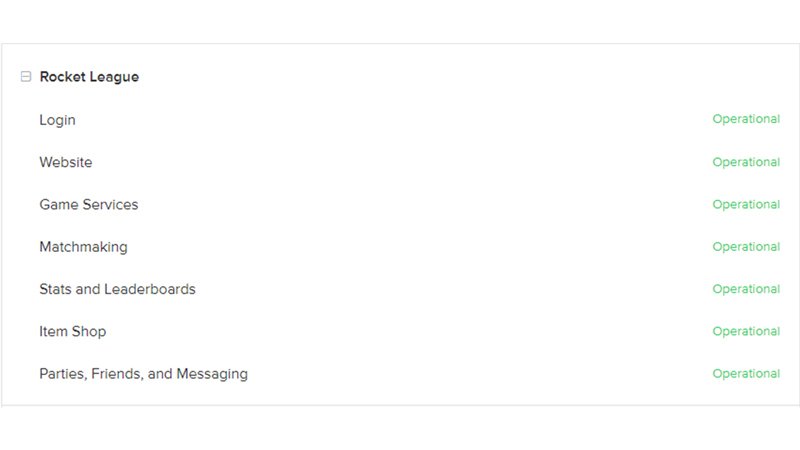
- Epic Games Status Page: Epic Games operates a dedicated status page that covers all their services, including Rocket League. This page will often detail specific incidents, their scope, and estimated resolution times.
- In-Game Notifications: Sometimes, Rocket League will display messages in the client about ongoing issues.
Step 3: Utilize a Third-Party Server Status Checker
As discussed, these tools provide valuable data beyond official announcements.
- Observe Regional Status: Look for “Online” or “Offline” indicators for your preferred server region. If it’s offline, you know it’s not just you.
- Analyze Latency and Jitter: Pay close attention to these metrics for your region. High latency (orange/red) or fluctuating jitter can explain lag even if servers are technically online.
Step 4: Rule Out Client-Side Issues (If Your Connection & Servers Are Fine)
If both your internet and Rocket League’s servers appear healthy, the problem might lie with your game client or system.
- Restart the Game/Platform: A simple restart of Rocket League, your console, or your PC can clear up temporary software glitches.
- Verify Game Files: On PC, use your game launcher (Steam, Epic Games Launcher) to verify the integrity of Rocket League’s game files. This can fix corrupted installations.
- Check Firewall/Antivirus: Ensure your firewall or antivirus software isn’t blocking Rocket League’s connection to the internet. Temporarily disabling them (with caution) can help diagnose this.
- Update Network Drivers: Outdated network adapter drivers on PC can sometimes cause connectivity issues.
Step 5: Consider Switching Server Regions (Temporarily)
If your primary region shows elevated latency or matchmaking issues, but other regions are performing well, try switching.
- Select a Nearby Region: Choose a region geographically close to you that shows green latency on a server status checker. Be prepared for slightly higher ping than your optimal region.
- Understand Trade-offs: Playing on a non-optimal region might introduce more latency but could allow you to play if your preferred region is experiencing an outage.
Case Snippets: Real-World Scenarios
- The “Queue Time Nightmare”: Player X in São Paulo logs on during a Monday afternoon (off-peak). Game servers are fine, but matchmaking takes 5+ minutes for a ranked 2v2. A server status check shows São Paulo matchmaking servers are “online” but with low player density. Resolution: Patiently waits, or switches to a casual mode, understanding it’s a regional player base issue, not an outage.
- The “Rubber Banding Rollercoaster”: Player Y in London experiences severe rubber-banding in matches, despite their internet seeming fine. A server status checker shows the London servers are “Online,” but their personal latency to London is yellow (250ms), and jitter is sporadically high. Resolution: Power cycles router, checks for other heavy network usage in their home, confirms no widespread outage, suggesting a localized ISP routing issue or home network congestion.
- The “Cannot Connect” Wall: Player Z in Ohio can’t log into Rocket League at all; an error message states “Servers Offline.” Checking Epic Games’ official status page confirms a major North American outage. Resolution: No personal fix possible. Waits for official announcement of resolution.
Quick Answers: Common Questions About “League Servers Down”
Q: Is Rocket League down right now?
A: As of March 26, 2026, at 11:50 AM PDT, monitoring tools and user reports indicate no current problems with Rocket League, and the service is working normally. However, this can change rapidly. Always check official sources like the Epic Games Status Page or Rocket League’s official Twitter/X, and a live server status checker for the most up-to-date information.
Q: What’s the difference between ping and server status?
A: Server status tells you if the game servers are online, responsive, and accepting connections. Ping (latency) measures the quality of your individual connection to those servers. A server can be online, but if your ping to it is high, you’ll still experience lag. Ping measures your connection quality, while server status indicates their operational health.
Q: My ping is high, but the servers are online. What gives?
A: High ping when servers are online points to an issue with your local internet connection, your ISP’s routing to the game servers, or network congestion. This is distinct from a “league servers down” scenario. Troubleshoot your router, check for background downloads, or contact your ISP.
Q: Can I get banned for trying to connect to a down server?
A: No, attempting to connect to a server that is down or experiencing issues will not result in a ban. The game client simply won’t be able to establish a stable connection.
Q: How often do Rocket League servers go down?
A: Based on past data, Epic Games (the publisher) experienced 6 incidents (2 major outages, 4 minor incidents) over the last 90 days, with a median duration of 43 minutes. While incidents occur, major outages are relatively infrequent, and minor issues are usually resolved quickly.
Getting Back in the Game: A Rapid Decision Tree
Facing “league servers down” symptoms in Rocket League can be a headache, but a methodical approach will quickly get you answers, and often, a solution.
- Can I browse other websites/stream video normally?
- NO: Your local internet is the problem. Power cycle your modem/router, check ISP status, or contact your ISP.
- YES: Proceed to step 2.
- Does Rocket League’s official Twitter/X or Epic Games Status Page report an outage?
- YES: The servers are genuinely down. There’s nothing you can do but wait for an official fix. Keep an eye on their announcements.
- NO: Proceed to step 3.
- Does a reliable server status checker show your preferred region as “Online” with low latency (green)?
- NO (Offline/High Latency/High Jitter): The servers for that region are having issues. Try switching to a different, healthy server region (if possible), or wait for the issue to be resolved.
- YES (Online & Healthy): The problem is likely client-side. Restart the game/platform, verify game files, check your firewall/antivirus, and consider updating network drivers.
By following this streamlined process, you can efficiently diagnose the problem and spend less time troubleshooting and more time landing those epic aerial goals.